Scattered tools and manual handoffs slowed campaign launches and made workflows hard to scale for our marketing and marketing revenue operations customers.
WHAT I LED
I designed the product from the ground up, leading UX strategy, customer discovery, workflow architecture, and AI interaction design in collaboration with VPs, PMs, and engineers.
01 · THE PRODUCT
A clearer way to build and run campaigns.
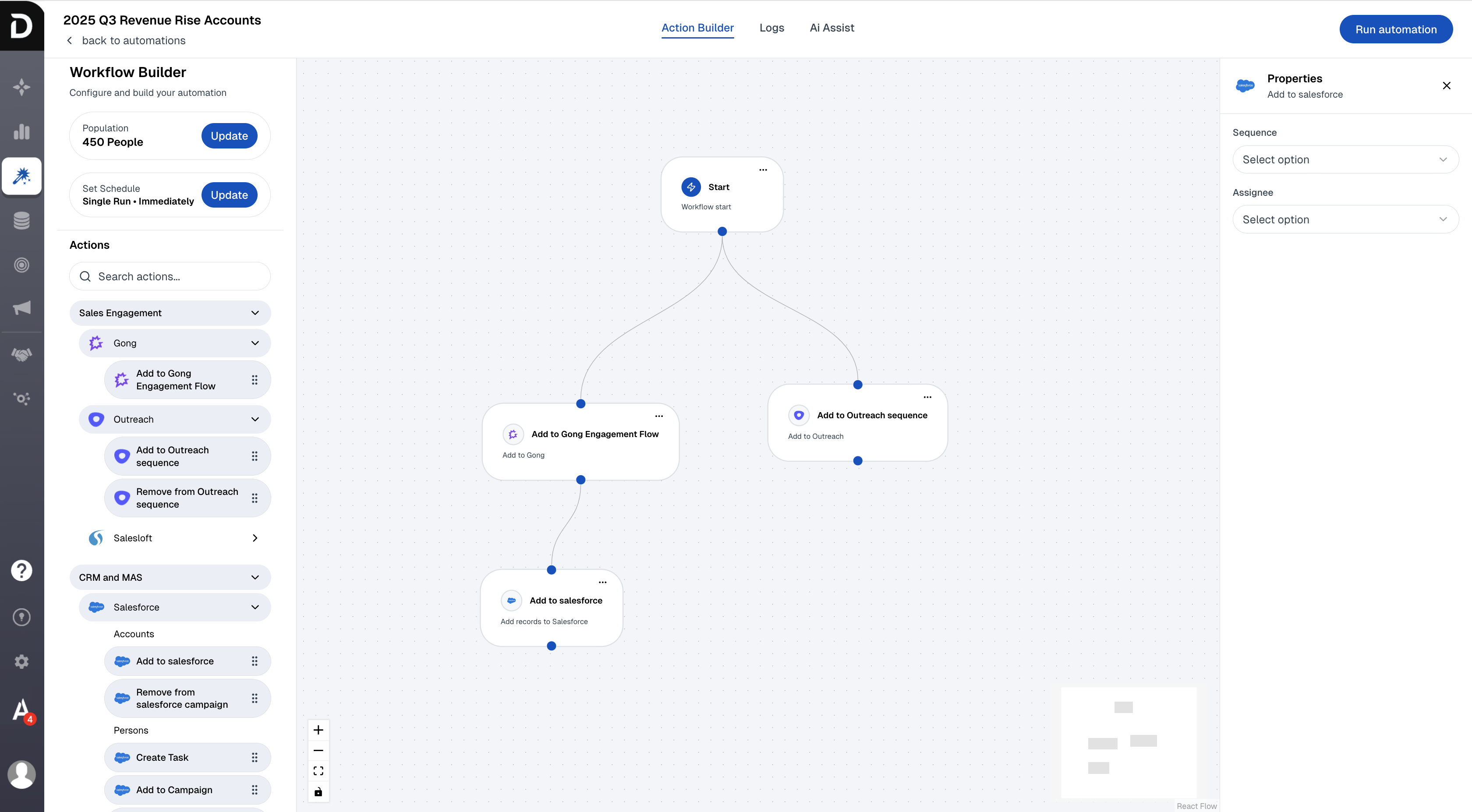
I designed a visual workflow builder that made branching decisions easier to follow, with analytics and an Assistant to help customers understand live automations.
The solution: A visual workflow builder with clear branching logic and review before execution.
SHIPPED PRODUCT
Platform highlights
The modular drag-and-drop workflow builder. The full workflow made campaign decisions visible in one place. Customers reported faster alignment and fewer meetings because they could review the built workflow together.
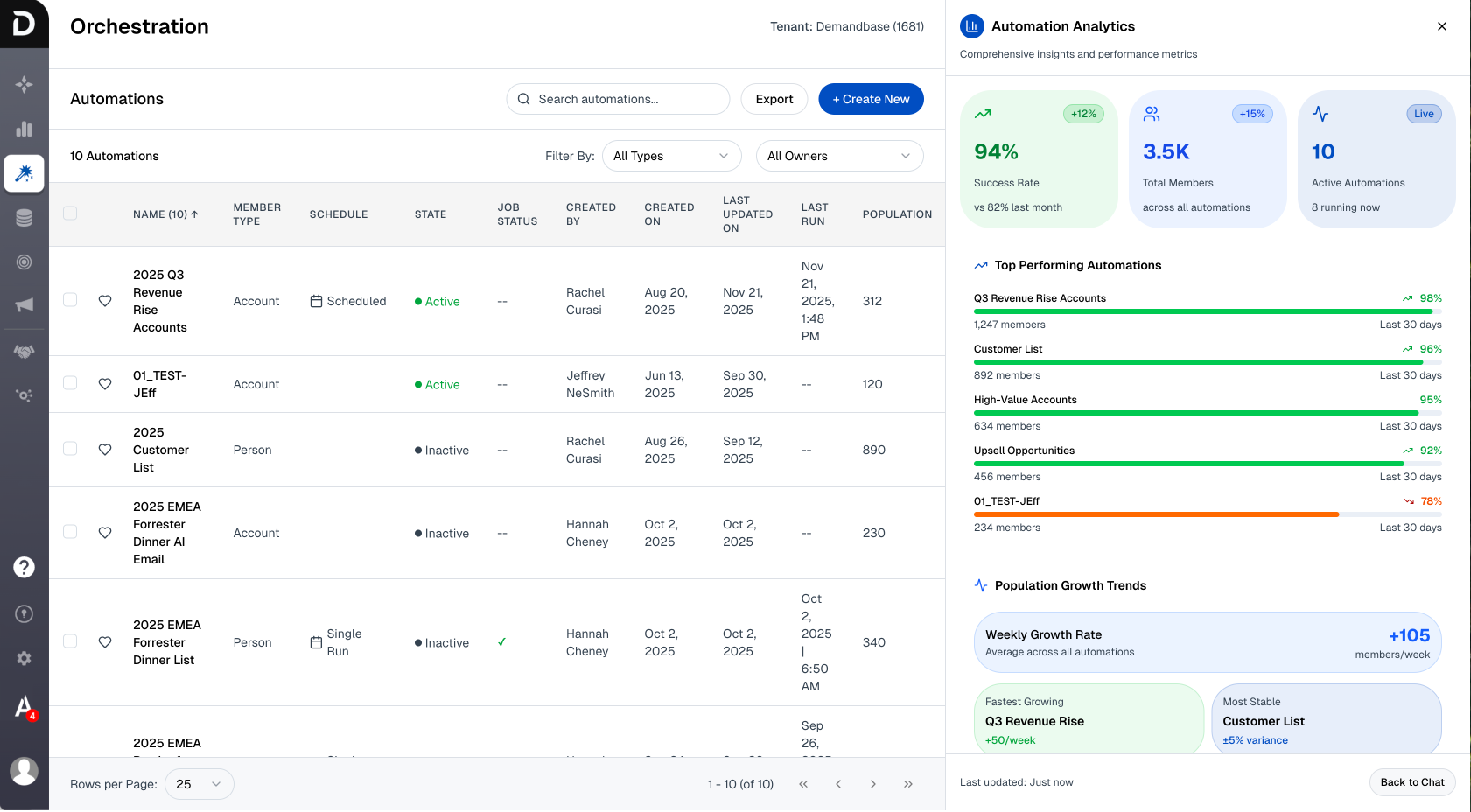
Automation analytics, performance across every workflow
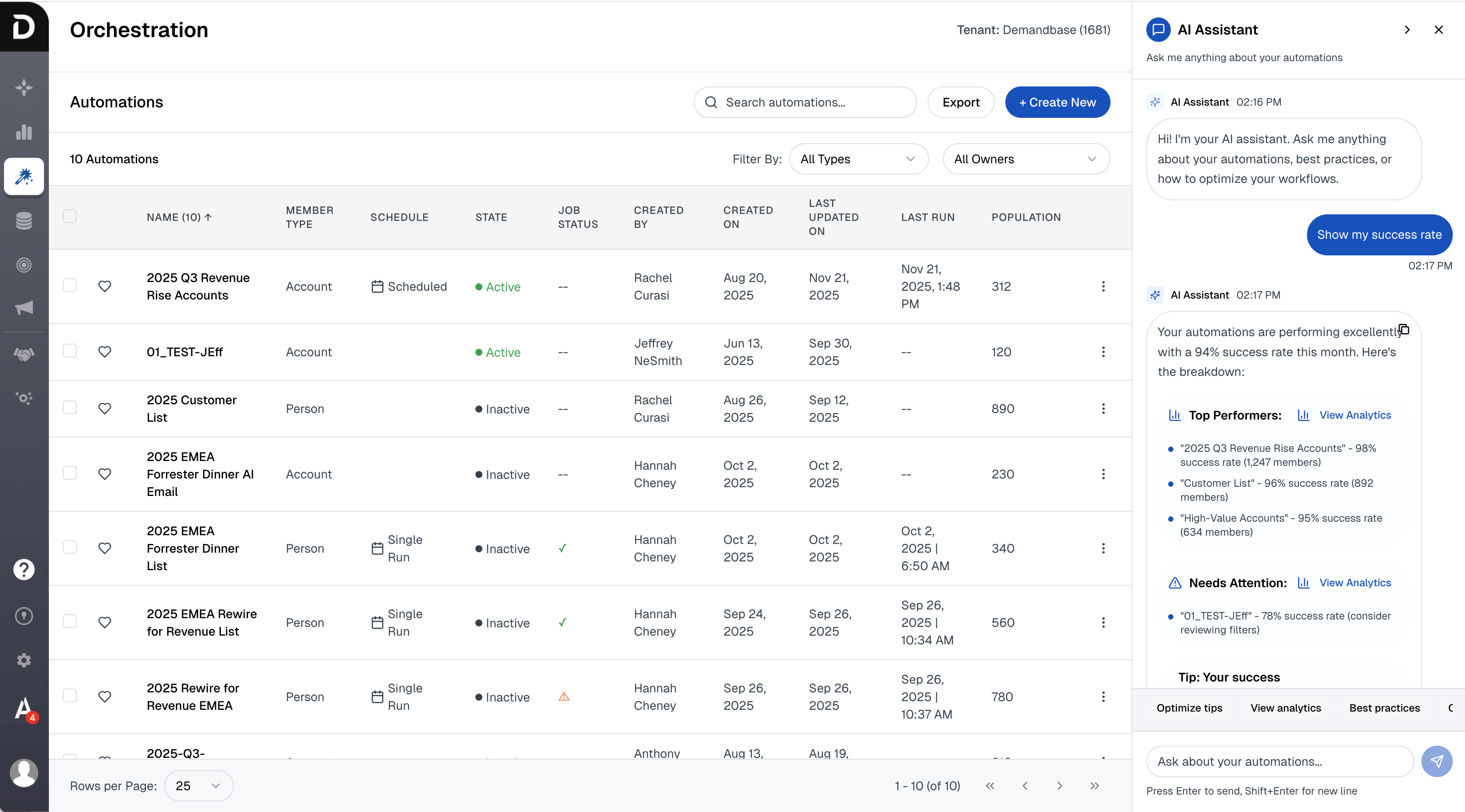
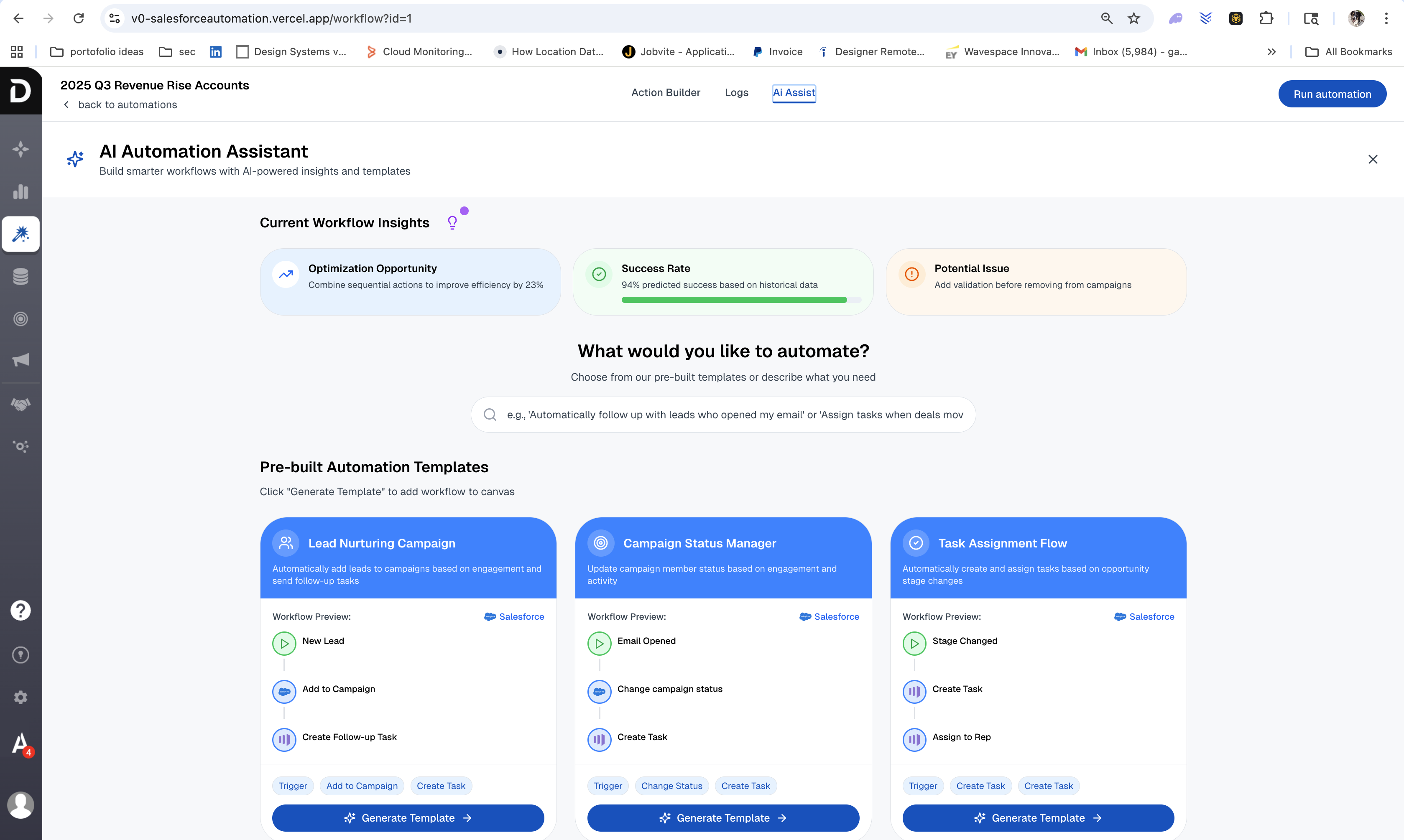
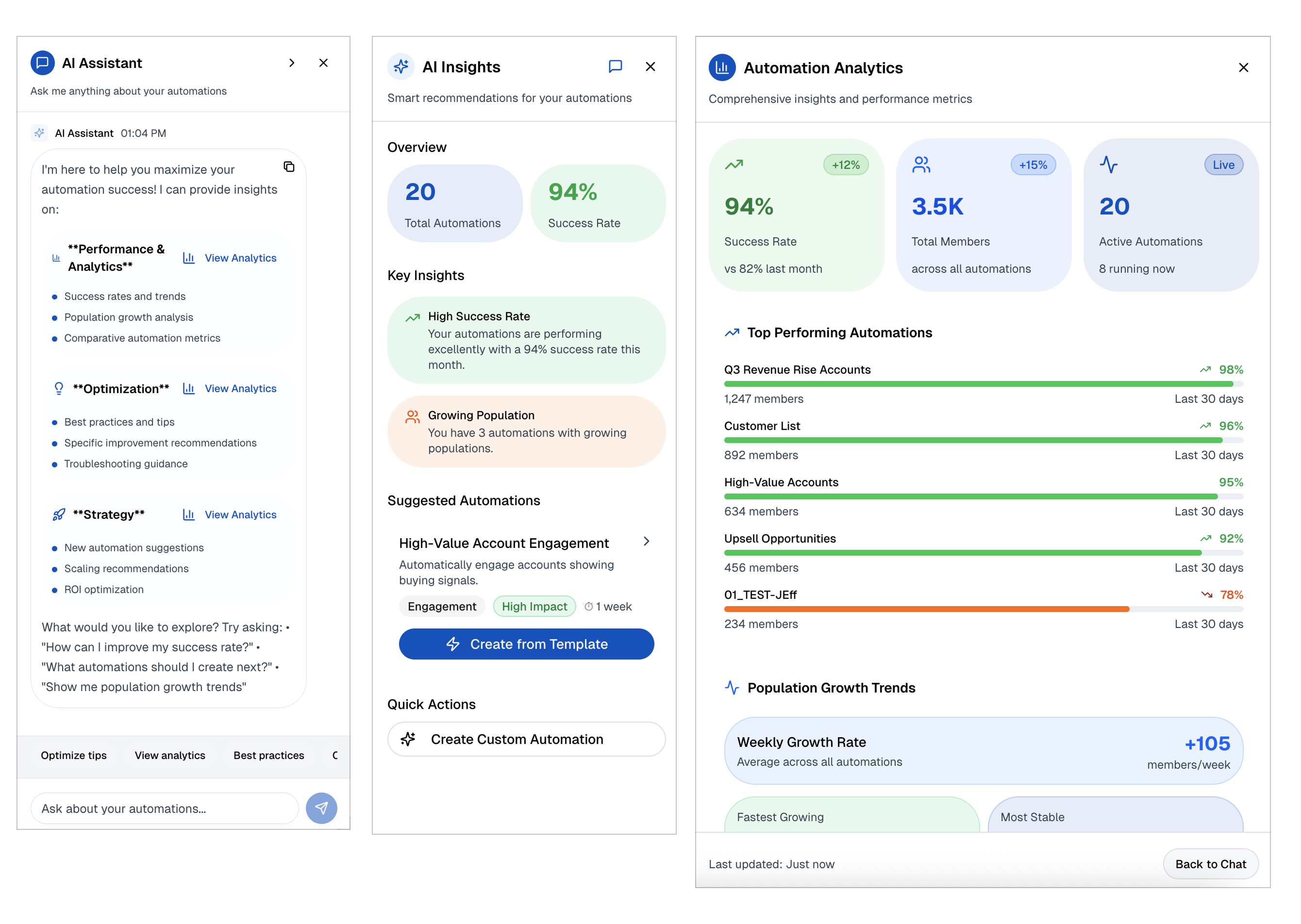
AI Assistant answering questions about live automations
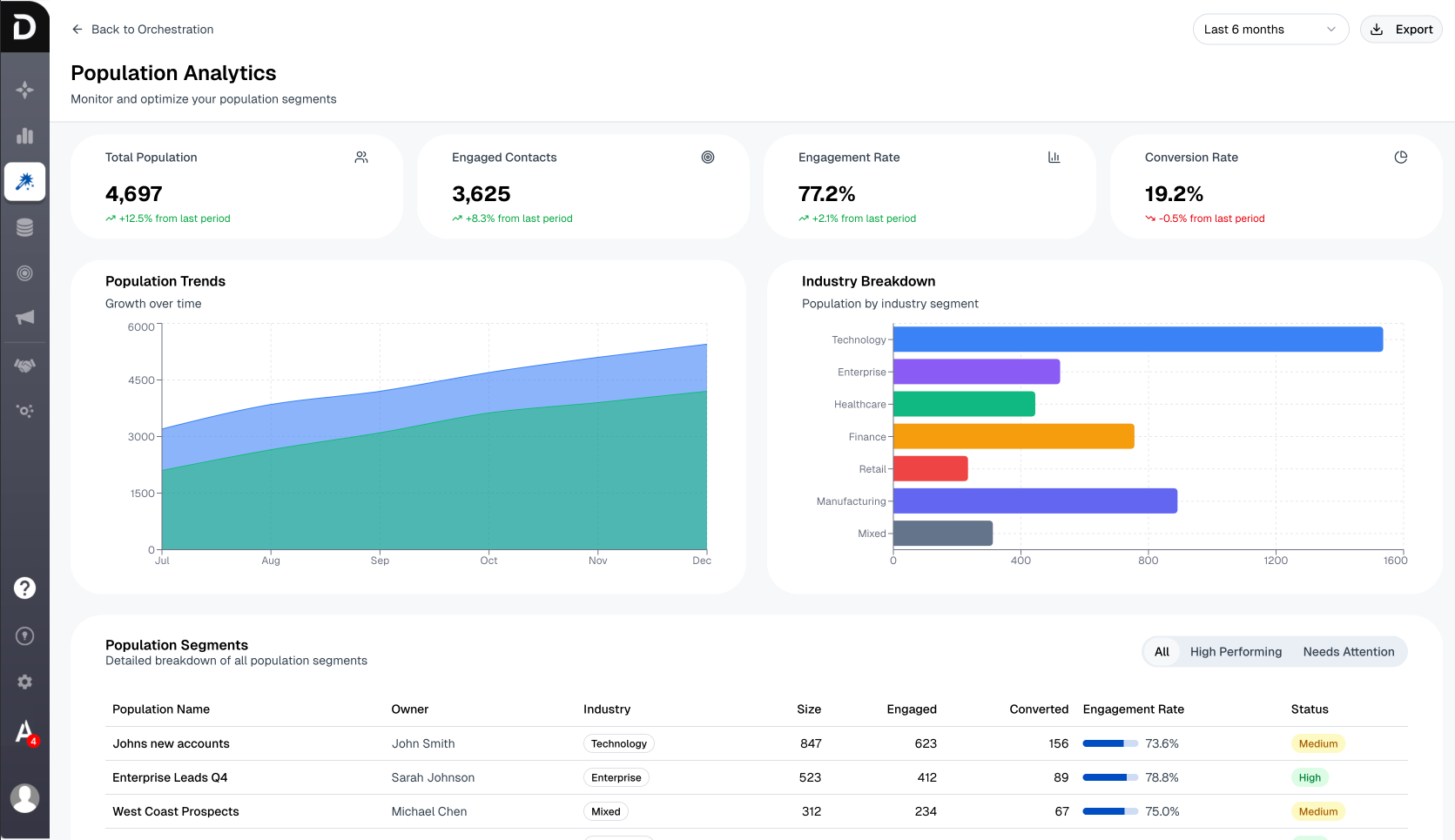
Population analytics, segment health at a glance
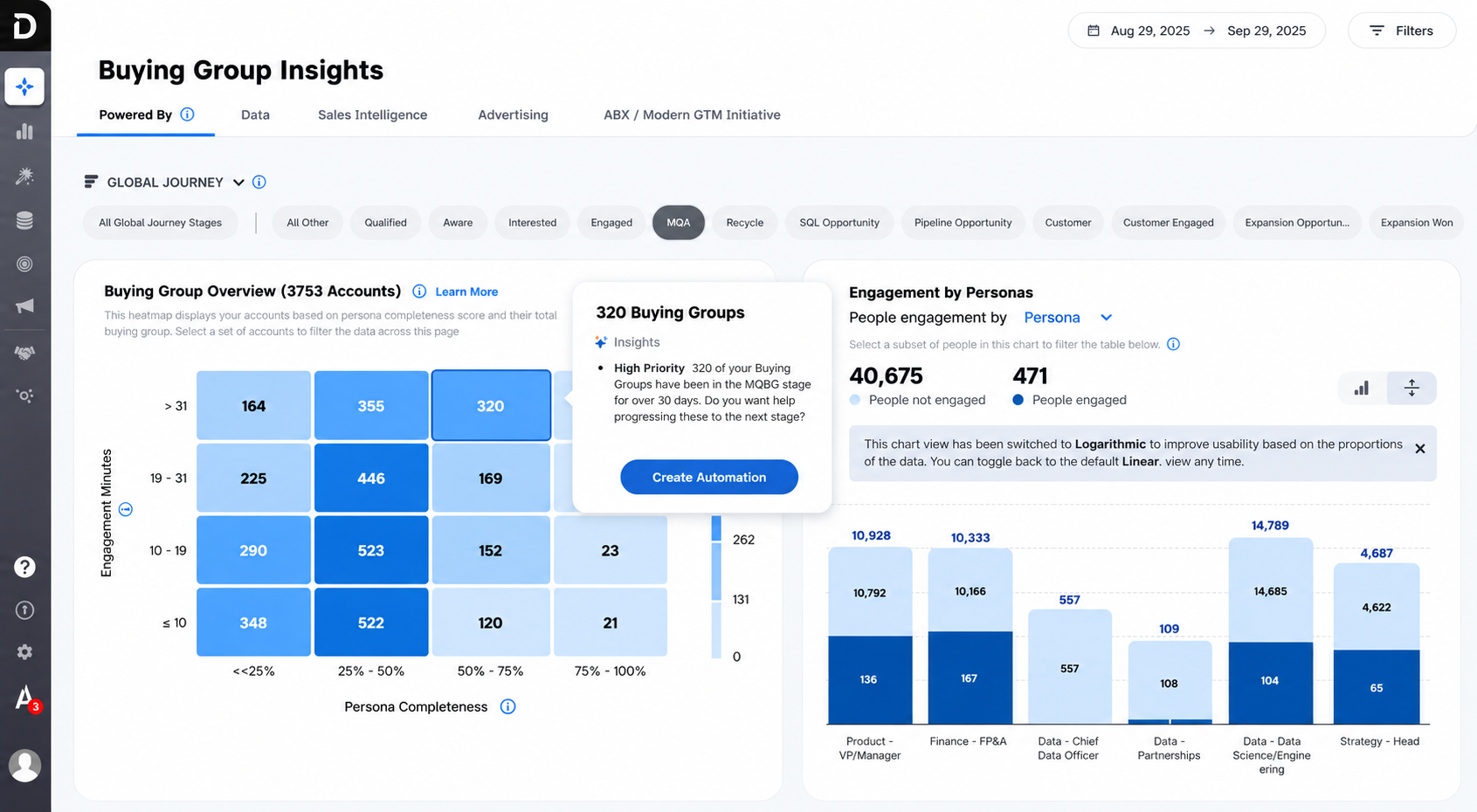
Buying Group Insights, create an automation straight from a signal
1 / 5
EARLY EXPLORATION · ROUND 1 PROTOTYPE
An early branching prototype built with Claude to align stakeholders on the core concept before moving into detailed design and development.
Explore the platform experience in an interactive prototype. The shipped product is shown in Platform highlights; this link opens a prototype, not the production application.
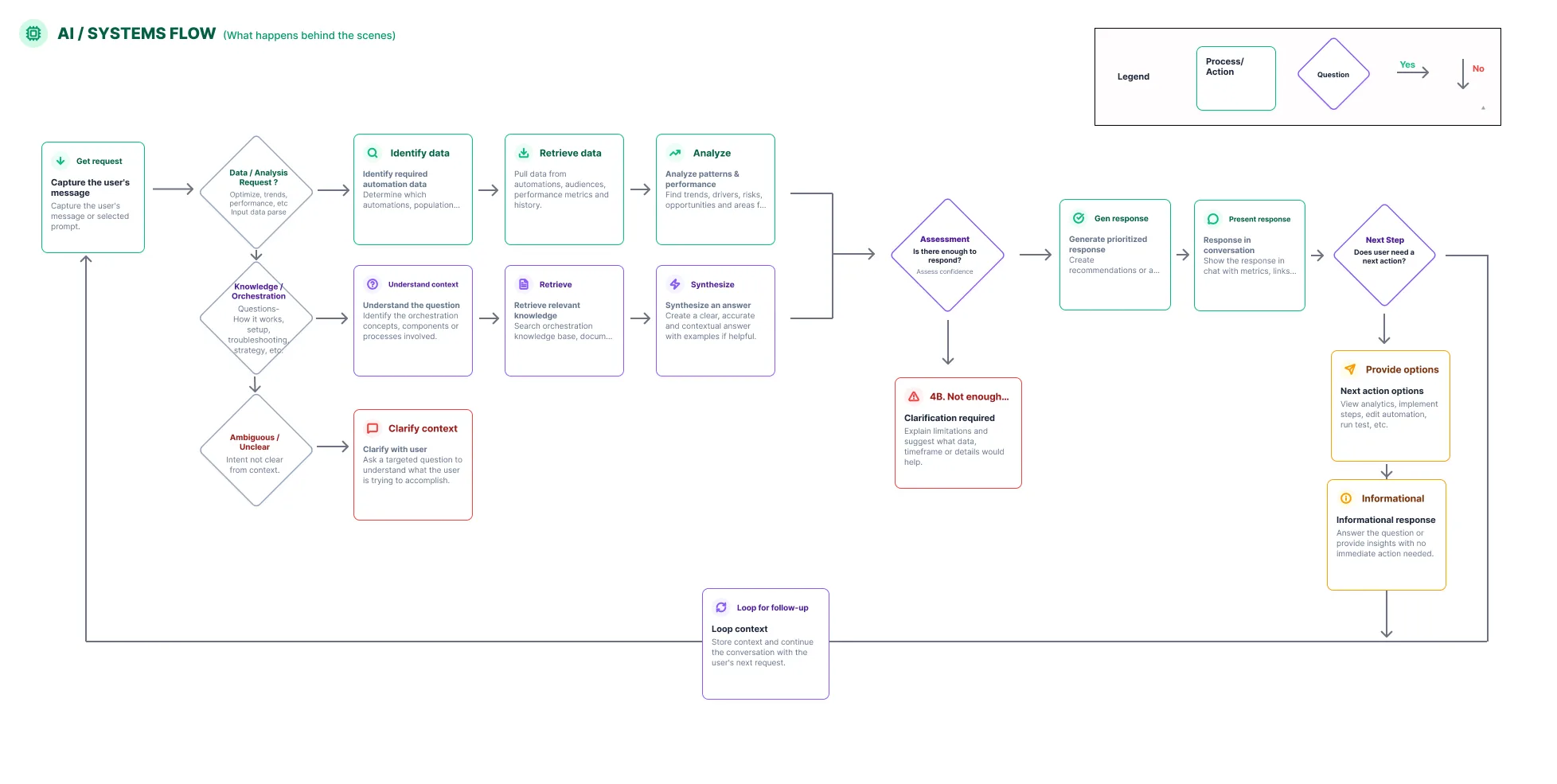
I led the effort to make AI decision-making understandable, partnering with engineering to create a visual model. Its positive reception prompted me to share it across the organization, including with senior leadership, helping teams understand how the AI worked and when it needed human input.
From engineering logic to a shared business understanding: how the AI processes requests, handles uncertainty, and guides the next step.
04 · CUSTOMER IMPACT
Faster creation. Fewer meetings. More campaigns.
Customers reported campaign creation taking about one week instead of one month, with fewer meetings. Pendo showed multiple customers creating 10+ campaigns per month, exceeding our target of three.
Fewer alignment meetingsreported in surveys and follow-up user testing
10+ campaigns createdper customer per month across multiple customers in Pendo, against a target of three
More leads and salescustomers reported that launching more campaigns generated more leads and sales for their businesses
“This cut our automation setup time by at least 50%.”
Proposed the design direction and worked closely with engineering throughout development.
Partnered with the PM on roadmap priorities, using customer research to align stakeholders on what to build.
The final experience. The modular drag-and-drop workflow builder.01 · About
About the project
Demandbase had retired an earlier automation product and saw renewed customer demand through its solutions consultants. I was asked to lead discovery and determine what customers needed from a new offering.
The new product connected campaign planning and execution across tools such as Salesforce, HubSpot, and advertising platforms, helping marketing and sales teams build and understand coordinated workflows.
Team
2 VPsEngineering & Product
2 Product Managers
6 Engineers
6 External stakeholders
Tools
Figma
FigJam
Pendo
Gong
Replit
v0
Claude
Codex
02 · The Problem
The problem
Marketing and sales customers couldn’t move fast because their campaign workflows were scattered, manual, and impossible to scale.
Workflows were fragmented across tools, creating inconsistent execution.
Even basic automations required engineering support.
Users lacked clarity on what workflows would do and who they would impact.
Scaling campaigns increased complexity, reducing trust and adoption.
As a result, automation felt fragile, onboarding slowed, and teams reacted too late to changing customer intent.
03 · Discovery
Discovery & research
Revealing the work behind a month-long campaign launch.
I led workshops with marketers and marketing operations teams, using storytelling and sketching exercises to understand their goals, frustrations, and how they created campaigns.
What surprised stakeholders: a campaign took about a month because customers planned, built, reviewed, and revised across disconnected tools, relying on repeated meetings to align.
How it changed the direction: I proposed one connected workflow and partnered with the PM on roadmap priorities. Customer stories and sketches helped stakeholders agree on what to build.
WHAT WE HEARD
“I just want to pick an action from my CRM and launch my campaign. Why is this so hard?”
A recurring customer theme
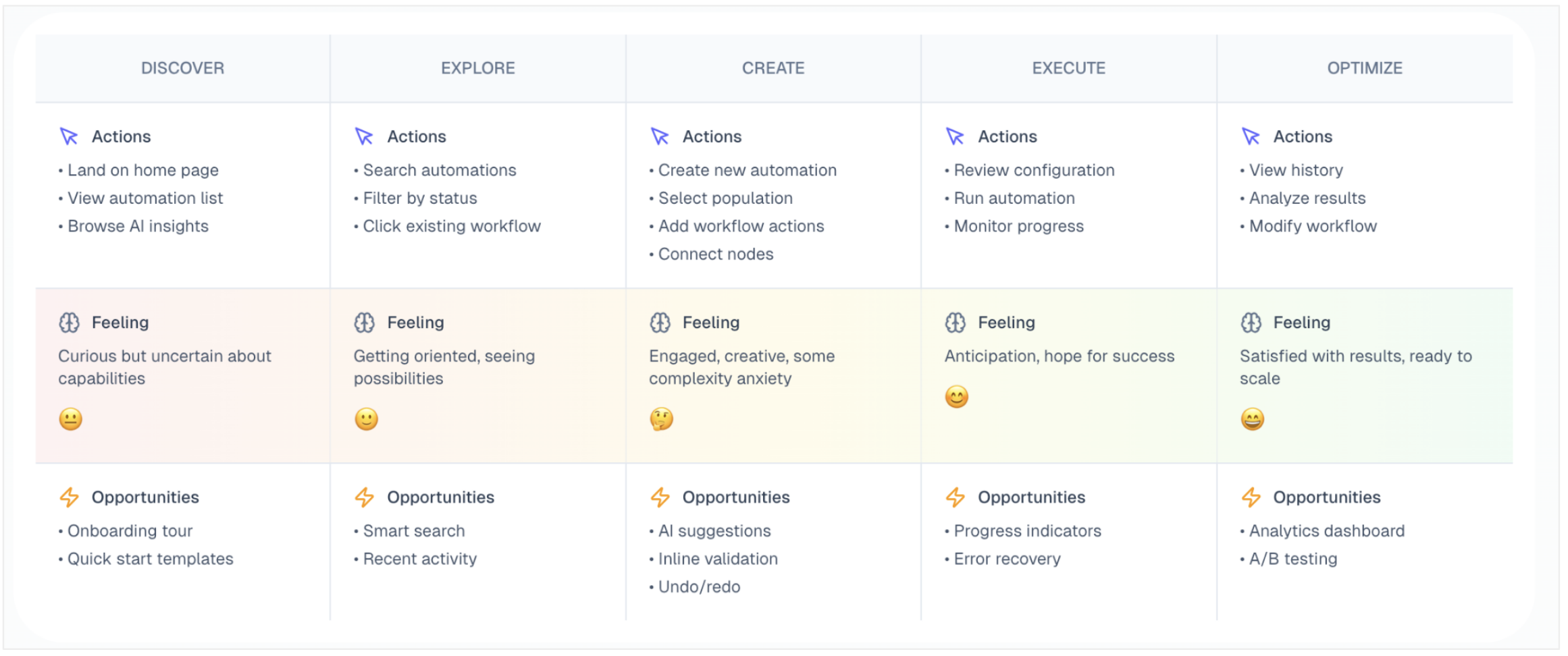
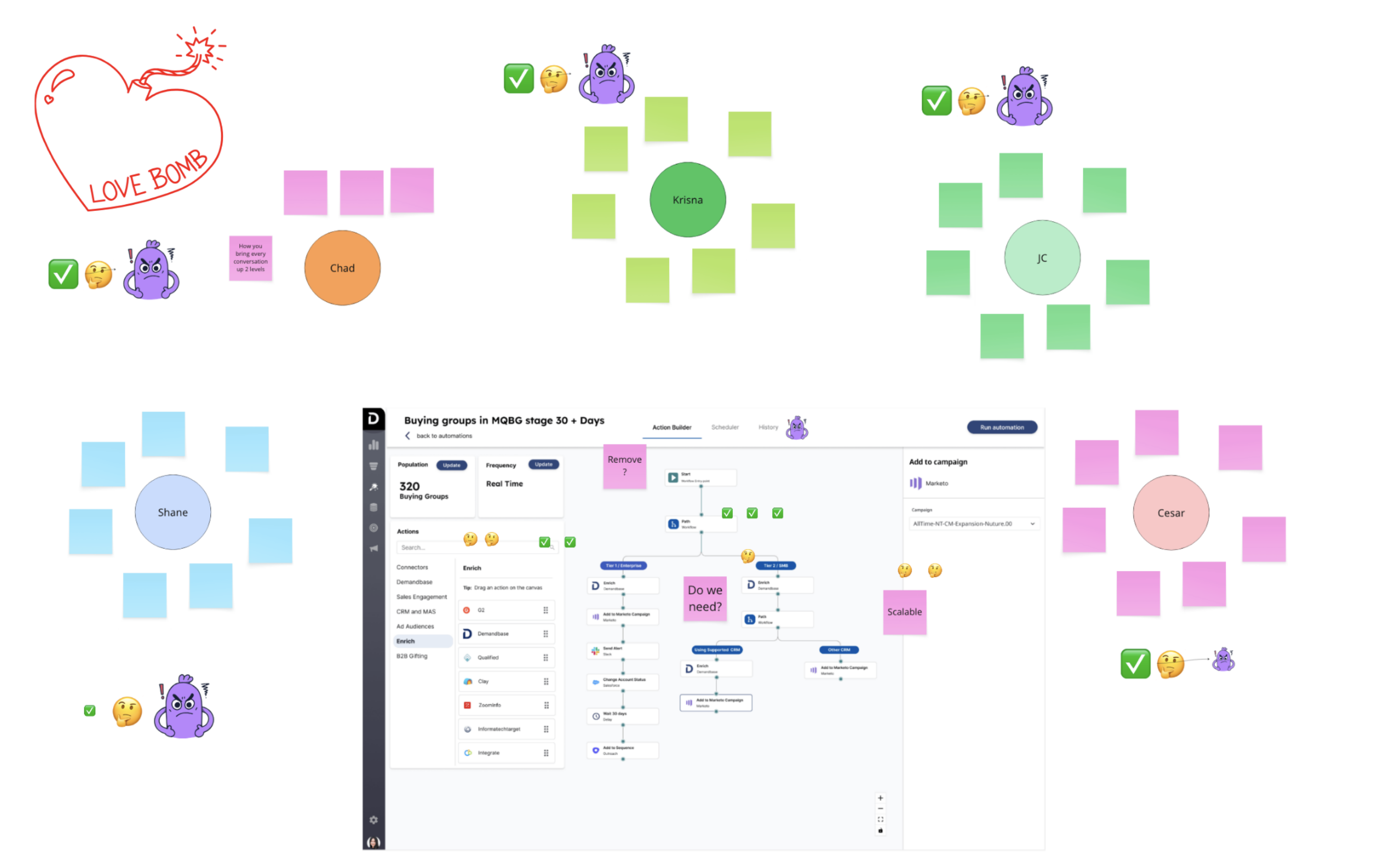
Journey mapped with the team, actions, feelings, and opportunities across the flowWorkshop board exploring what was possible with customers, VPs, PMs, and engineers. Hearing directly from customers challenged internal assumptions, revealed an unexpected design direction, and aligned leadership around the need for structural redesign rather than incremental feature additions.04 · Designs
Designs
Make complex campaign paths understandable, editable, and safe to launch.
Core principles
Clarity
Expose automation logic so users can understand cause and effect at a glance.
Scalability
Support increasing workflow complexity without increasing cognitive load.
Trust
Make system behavior predictable through previews, transparency, and feedback.
Control
Maintain human oversight in high-impact or low-confidence scenarios.
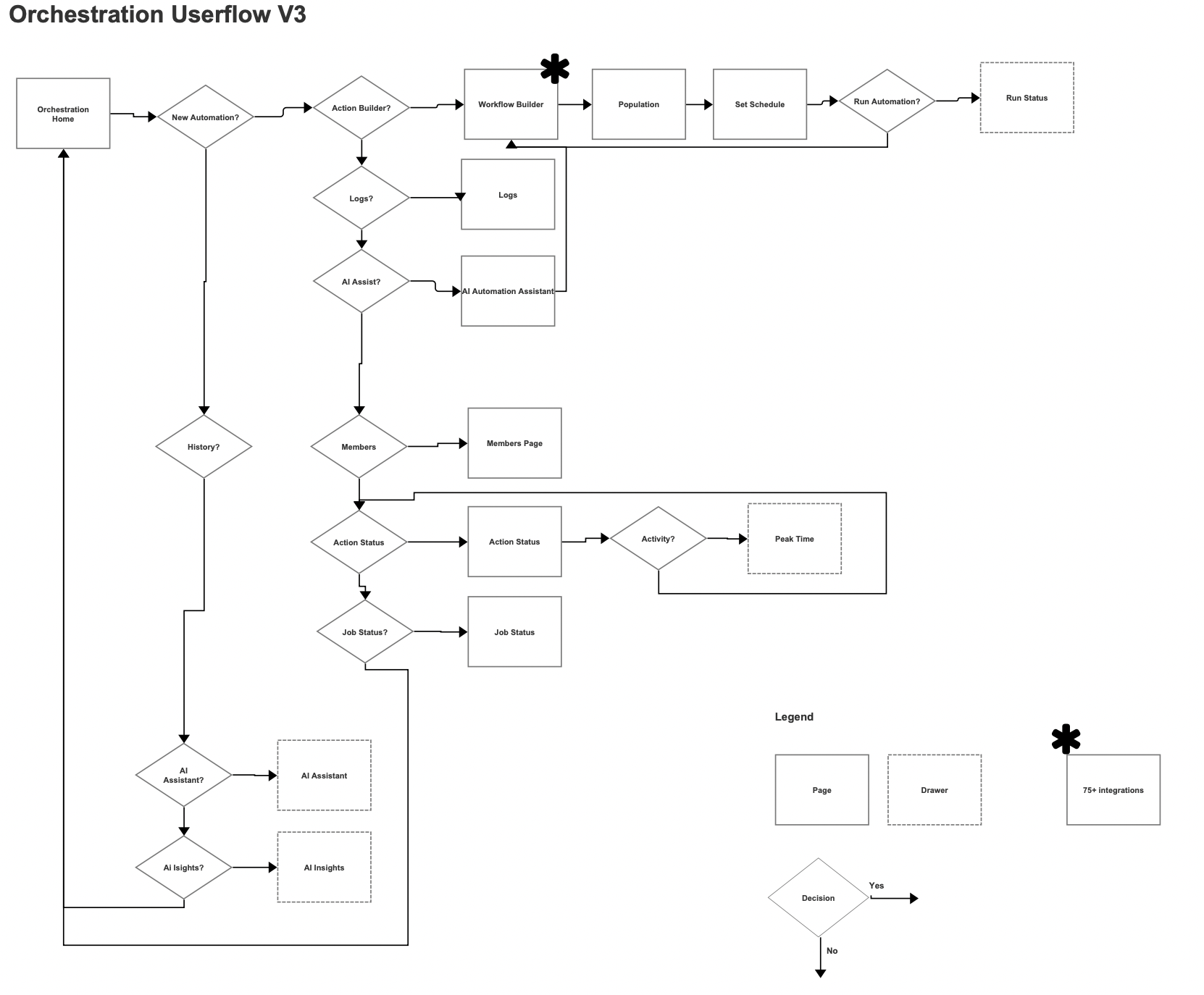
User flow
Orchestration user flow, v3EARLY EXPLORATION · NOT THE FINAL PRODUCT
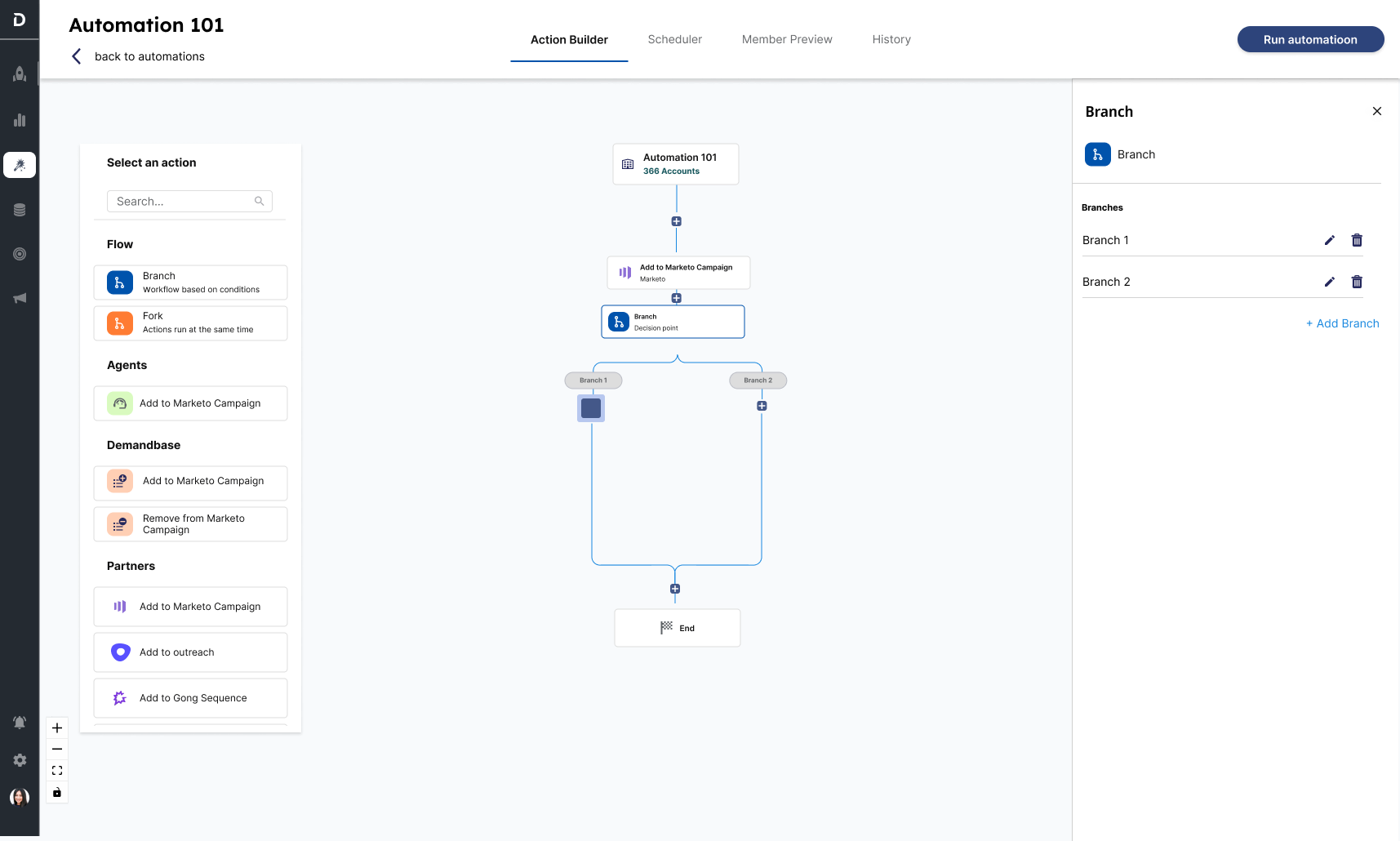
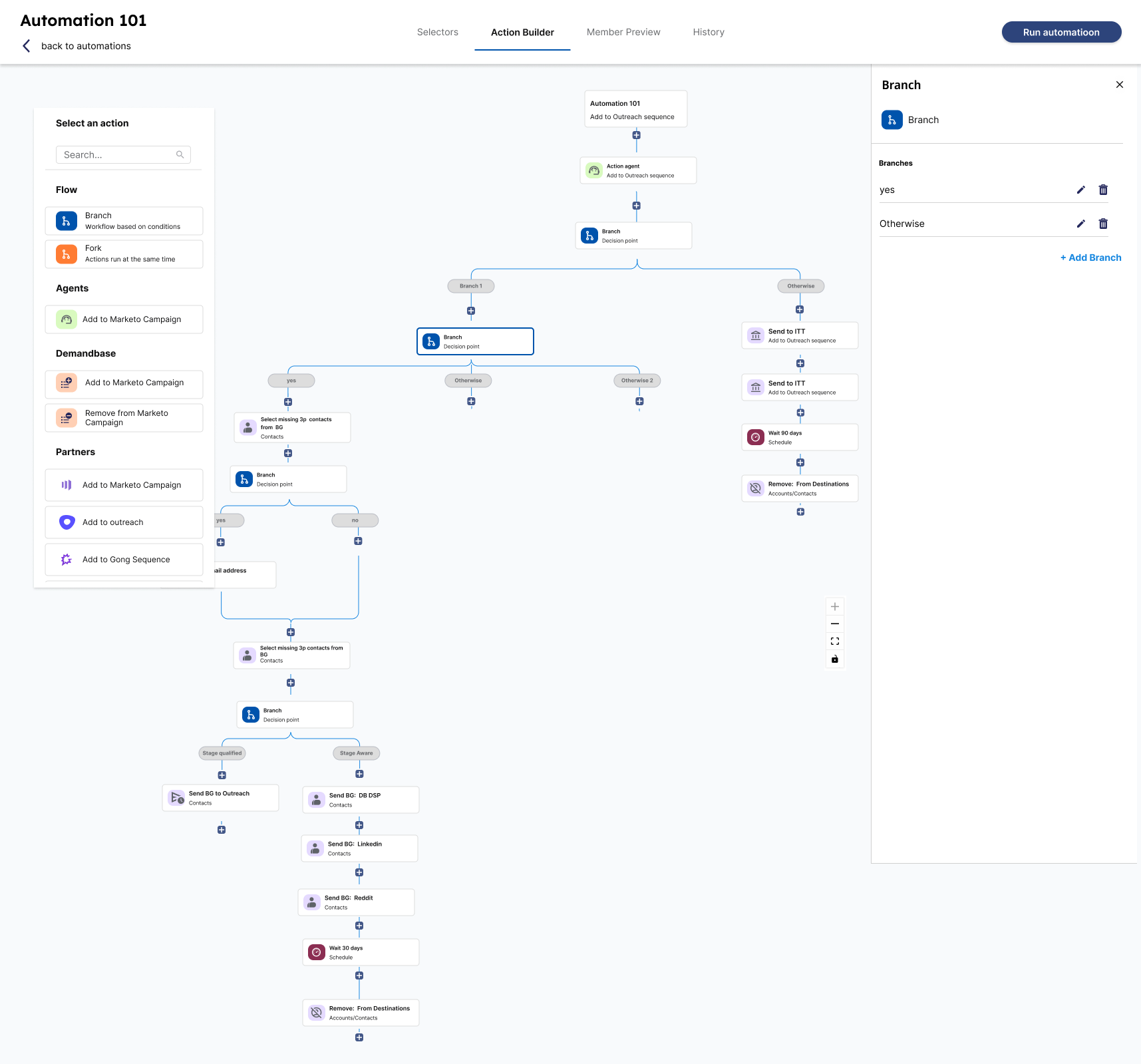
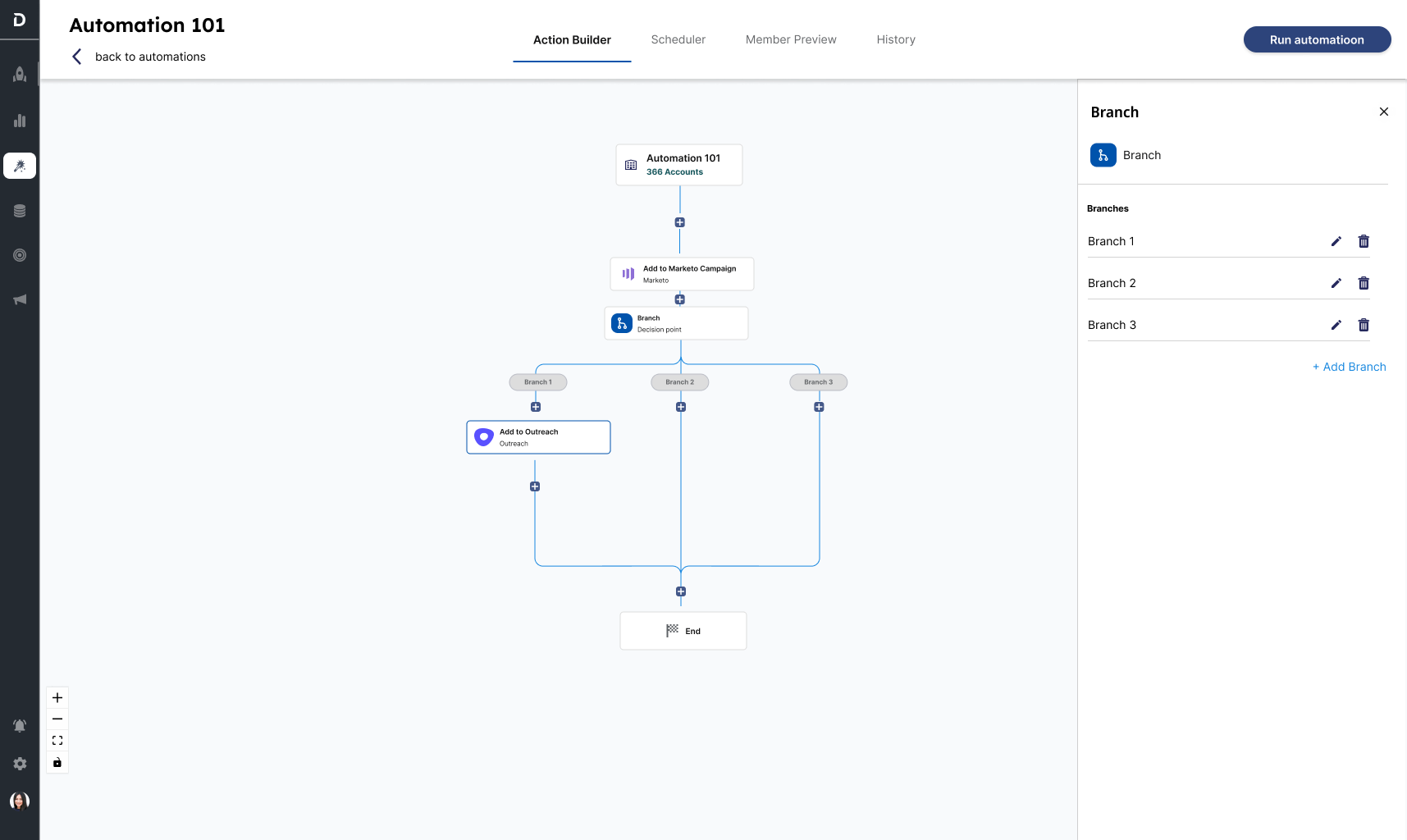
Round one: exploring structured branching
The first concept guided users through a rigid branching model, but engineering identified implementation complexity and delivery risk.
Two-path branching: define distinct paths within the workflow.
Complex workflows: test nested decisions and multiple actions.
Three-path branching: configure actions for each path.
1 / 3
Define the audience and timing before building
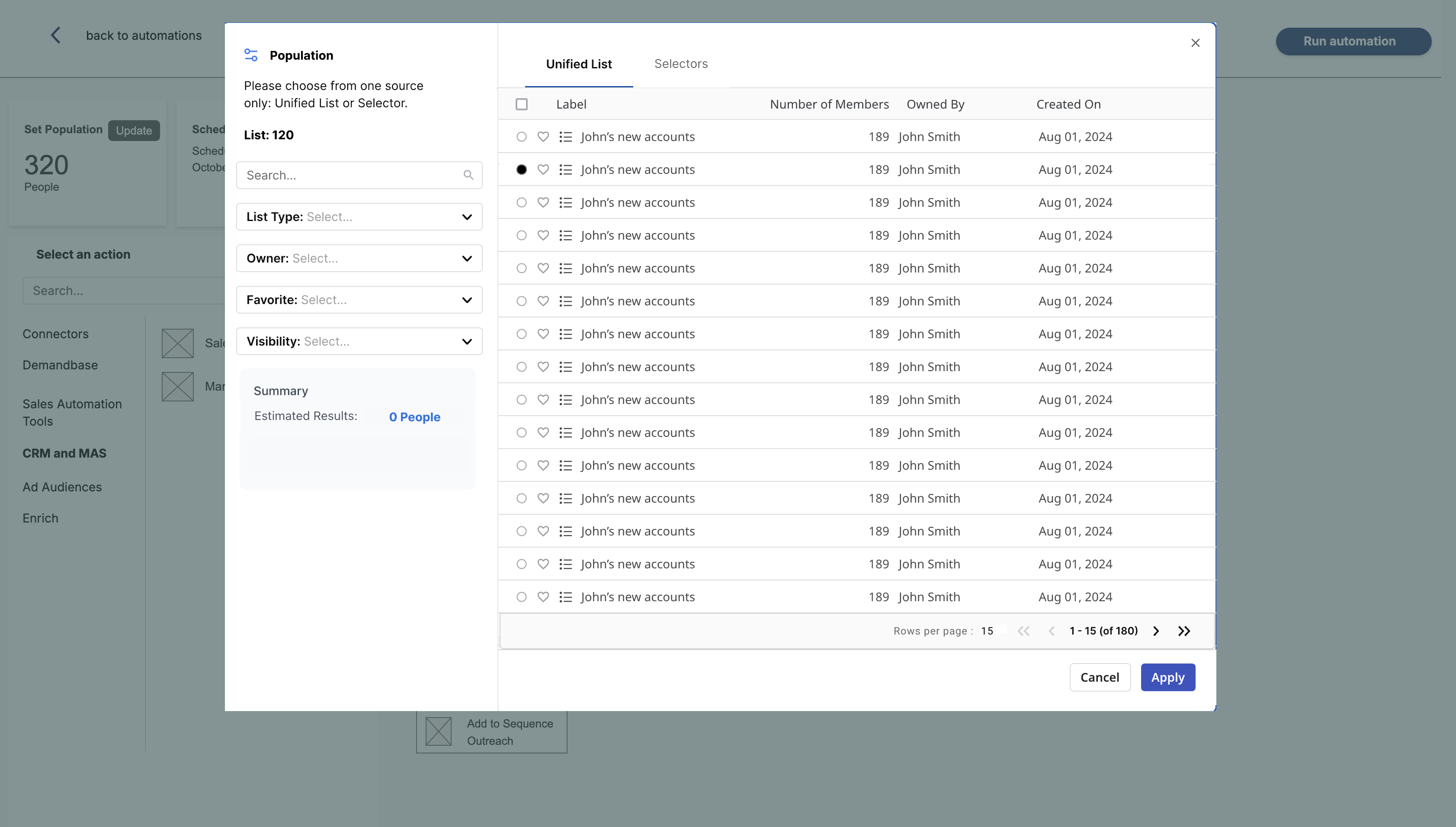
My PM initially favored taking customers straight into the workflow builder. Testing showed that customers wanted to set their population and schedule first, then start building. I used that feedback to shape the setup sequence: the shipped flow established population and scheduling before customers built their workflow.
The pivot: a flexible canvas with clear guardrails
My decision: move to a modular drag-and-drop canvas that engineering could deliver reliably. We retained clear branching, guided defaults, and review before execution, supported by AI-assisted setup and impact previews.
What changed for customers
Surveys put campaign creation at about one week instead of one month. Follow-up testing linked visible workflows to faster alignment and fewer meetings. Pendo showed multiple customers reaching 10+ campaigns created per month, exceeding our target of three.
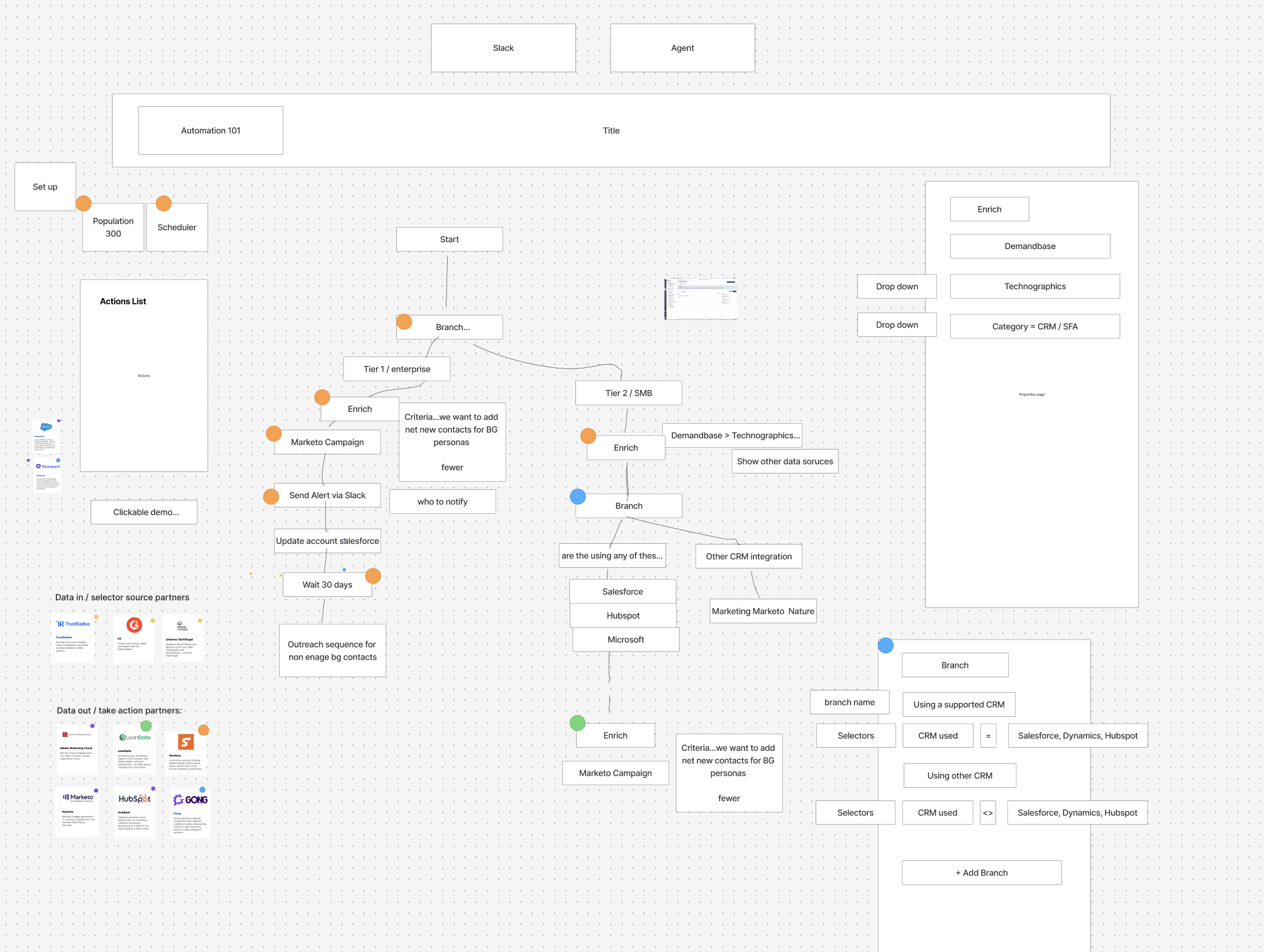
DESIGN PROCESS · WORKSHOP & WIREFRAMES
Love bomb workshop: sharing feedback to build a common understanding.
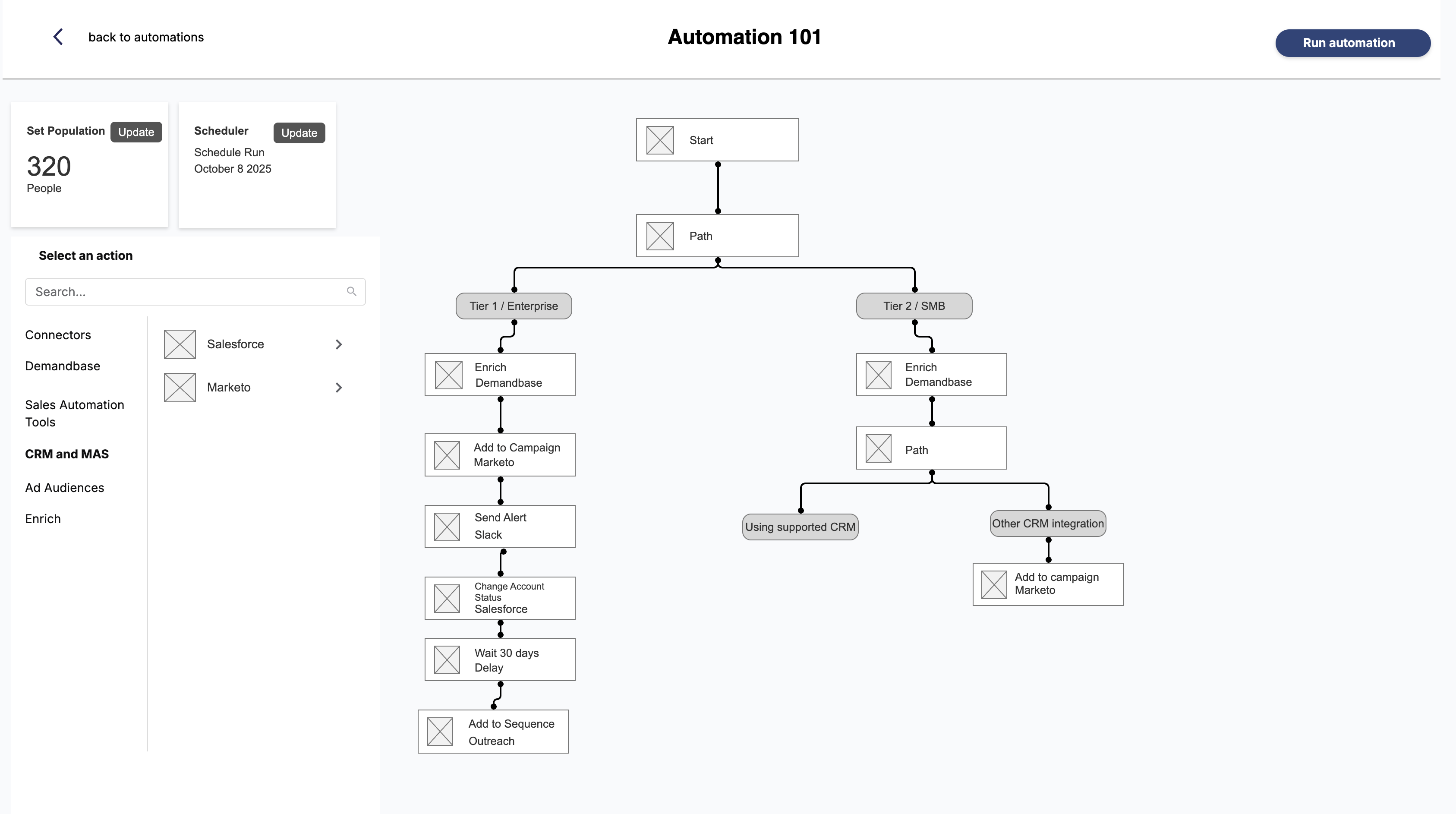
Workflow structure: tiered branching and connected actions.
Population selection: choose a unified list or use selectors.
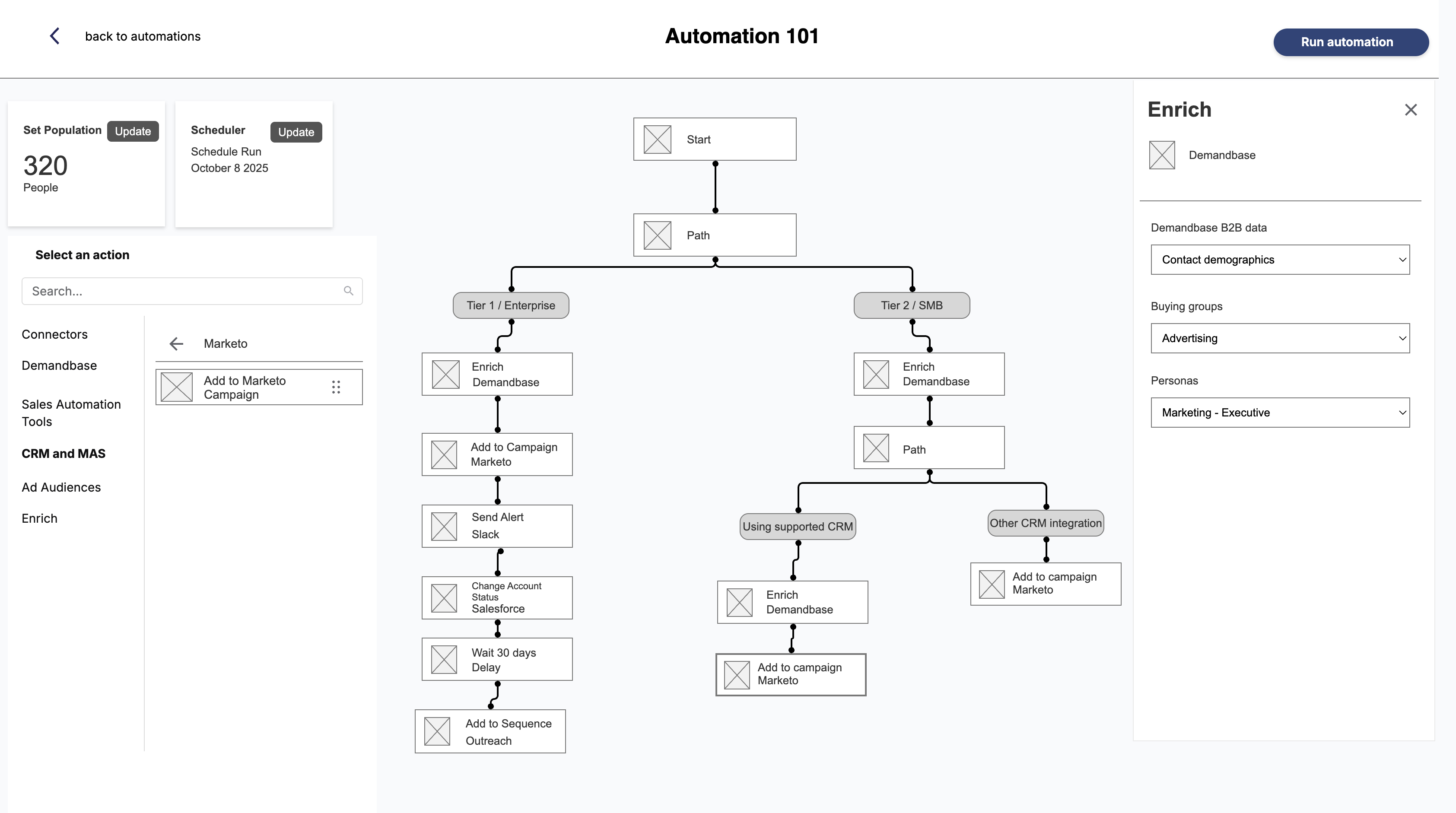
Action configuration: define enrichment within the workflow.
1 / 4
SHIPPED PRODUCT
Platform highlights
These screens show the final platform and AI capabilities that shipped.
The modular drag-and-drop workflow builder. The full workflow made campaign decisions visible in one place. Customers reported faster alignment and fewer meetings because they could review the built workflow together.
AI Automation Assistant, prebuilt templates and workflow insights
Automation analytics, performance across every workflow
AI Assistant answering questions about live automations
Population analytics, segment health at a glance
Buying Group Insights, create an automation straight from a signal
1 / 6
Extending the shipped platform
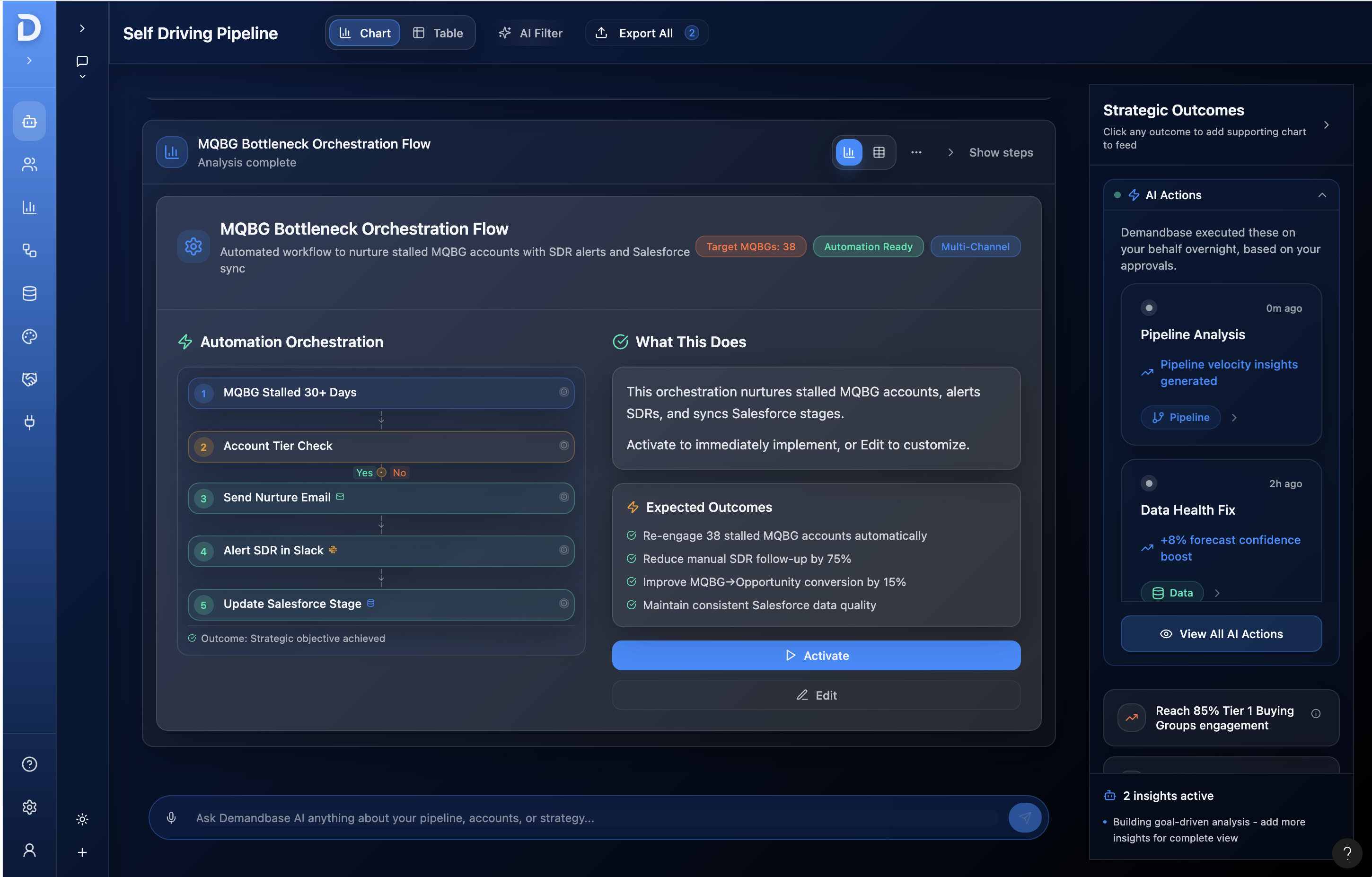
The self-driving pipeline applied AI to approved strategies while keeping activation and customization in customers’ hands.
The shipped self-driving pipeline experience, AI acting on approved strategy
Making AI understandable and reusable
I partnered with engineering to map how AI handled requests and uncertainty, then used that visual model to align designers, business stakeholders, and senior leadership on where human input was needed. I translated it into reusable guidance, review, and recovery patterns across Assistant, Insights, and Automation Analytics.
From engineering logic to a shared business understanding: how the AI processes requests, handles uncertainty, and guides the next step.
How the patterns worked in the product
1. Help users recover
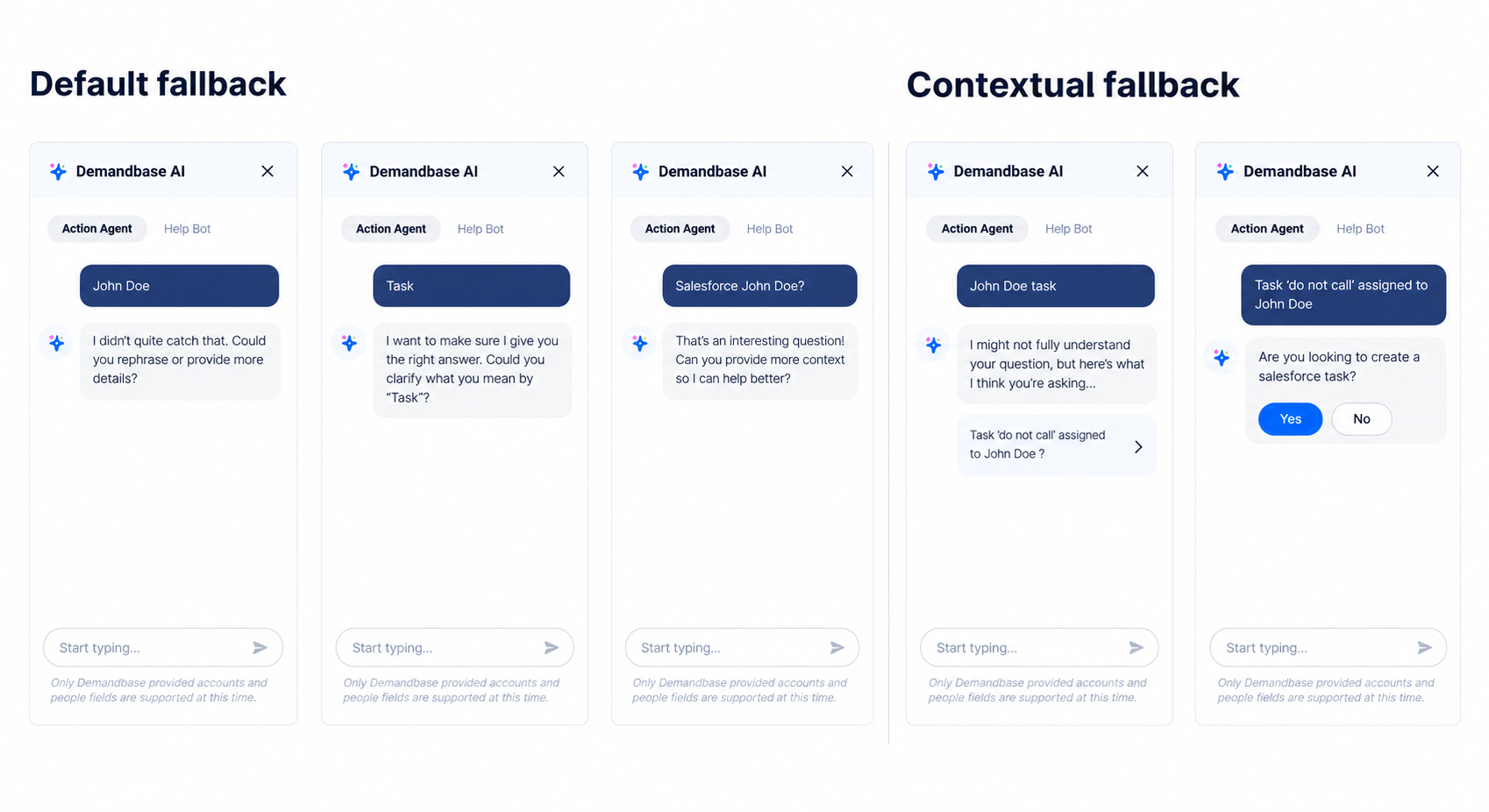
Default and contextual fallback states helped users understand what the agent could do and how to continue when it couldn’t complete a request.
Default and contextual fallback states for the AI agent
2. Keep actions editable
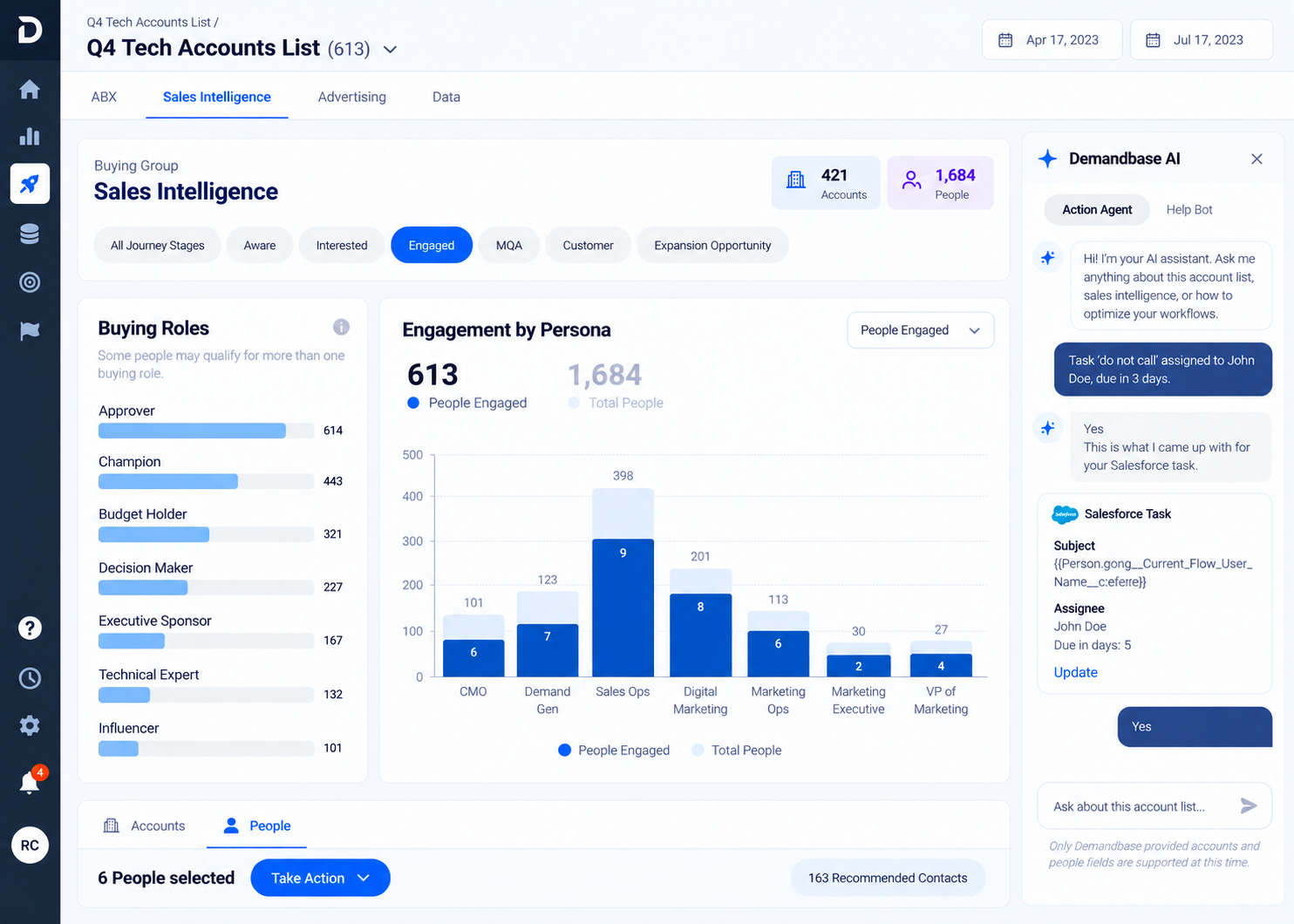
The agent drafted Salesforce tasks inside Sales Intelligence, keeping suggestions editable and requiring user review before execution.
The AI agent drafting a Salesforce task inside Sales Intelligence
3. Keep the experience consistent
Shared interaction patterns connected Assistant, Insights, and Automation Analytics so customers could carry their understanding from one surface to the next.
The AI surfaces, Assistant, Insights, and Automation Analytics as one consistent system
Principles that shaped the AI work
Make uncertainty understandable
Use clear states, explanations, and manual alternatives so users know what to expect.
Keep users in control
Keep suggestions editable, with review and overrides before execution.
Make guardrails reusable
Reuse messaging, error, and recovery patterns across AI features.
05 · Results
Results & impact
Customer-reported time savings, increased campaign creation, and closed product sales demonstrated the shipped platform’s impact.
1 month 1 week
approximate campaign creation time
Multi-million-dollar
closed product deals, as reported by sales
Fewer alignment meetingsreported in surveys and follow-up user testing
10+ campaigns createdper customer per month across multiple customers in Pendo, against a target of three
More leads and salescustomers reported that launching more campaigns generated more leads and sales for their businesses
Customer impact
Time saved: customer surveys established the month-to-week comparison; follow-up testing explored why.
Adoption: Pendo showed multiple customers moving from roughly one to 10+ campaigns created per month, against a target of three.
Customer-reported business impact: customers reported launching more campaigns, which they said generated more leads and sales for their businesses.
Internal & business impact
Commercial impact: sales shared the values of closed product deals totaling multiple millions. The customer launch event led to sales conversations and purchases.
Clearer build expectations: interactive prototypes helped stakeholders understand interactions from the customer’s perspective and showed engineering the intended behavior, reducing clarification meetings and revisions.
Reusable AI patterns: shared interaction patterns helped engineering build features faster and were adopted by other designers and teams.
Customer feedback
This cut our automation setup time by at least 50%. We used to spend weeks stitching together data and now it’s all centralized and actually makes sense.
Demand Gen, cloud-based CRM software company
We finally have a single source of truth for targeting and performance. It’s not just automation, it’s alignment.
Our team’s velocity has doubled. What used to be a weekly sync is now an automated flow, with clearer guardrails.
Account Executive, financial services company
What I learned
Even a complex project became easier to understand when I spoke directly with customers. Hearing how they worked, what they needed, and where they struggled removed ambiguity and gave the team a clearer basis for design and roadmap decisions.